

How eSIM Works: Global 5G in 60 Seconds
No physical plastic SIM cards. No airport kiosk queues. No roaming bill shocks. Install automatically with 1-click or scan your QR code, land, and connect instantly.
From Checkout to Online in 4 Simple Steps
Designed from the ground up for seamless international travel.
Choose Your Destination
Search 190+ countries and regional bundles. Select the exact data allowance and trip duration you need with zero surprise fees.
- Local, Regional & Global Plans
- Transparent pricing & 5G speeds
Instant Secure Checkout
Pay securely with Credit/Debit Cards, Apple Pay, Google Pay, PayPal, or Crypto. Your profile is provisioned in seconds.
- Instant digital provisioning
- Encrypted 256-bit checkout
1-Click or QR Install
Tap 1-Click Install directly on your iPhone or Android phone from My eSIMs, or scan your QR code with your camera.
- 1-Click automatic install on iOS & Android
- Or scan QR code in under 60s
Land & Connect to 5G
Turn ON Data Roaming when you land. Your phone connects automatically to the fastest local partner carrier network.
- Tier-1 premium local carriers
- Keep home number for WhatsApp & calls
Step-by-Step Installation Guides
Install your eSIM before departure or upon landing using 1-Click Fast Install, QR code scanning, or manual entry.
Automatic 1-Click Installation (Zero Camera Scanning)
When viewing your purchased eSIM in My eSIMs on your phone, tap “Install on iPhone” or “Install on Android” to launch the native carrier setup wizard directly!
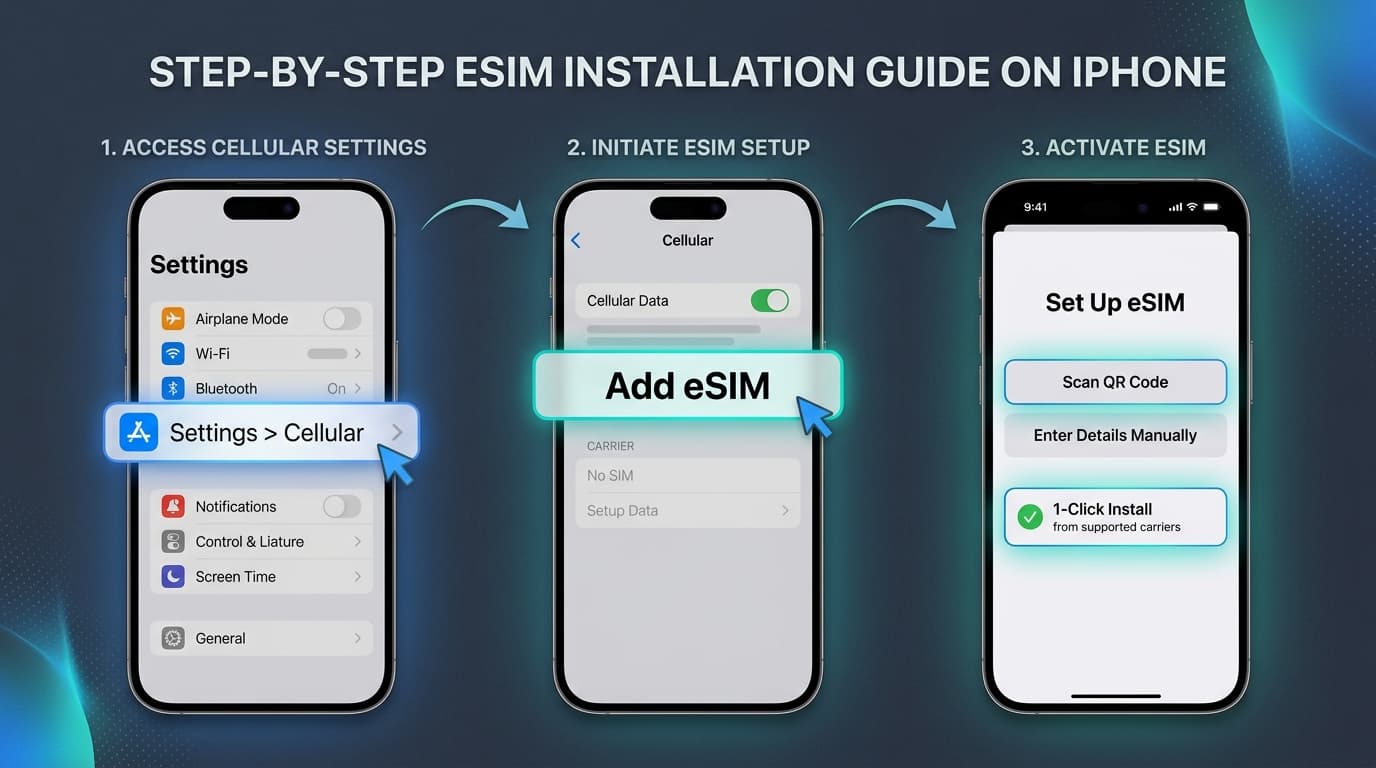
Apple iPhone eSIM Setup
iOS 15, 16, 17, 18+ • iPhone XS through iPhone 16 Pro Max
Open Cellular Settings
Open iPhone Settings and tap Cellular (or Mobile Service in UK/EU).
Tap “Add eSIM”
Select Add eSIM (or Set Up Cellular). If prompted with nearby transfer options, choose Other Options.
1-Click or Scan QR
Tap Install on iPhone in My eSIMs for instant provisioning, or choose Use QR Code and scan with your camera.
Connect on Arrival
Upon landing, select your travel eSIM for Cellular Data and toggle Data Roaming ON.
Important Checklist for Seamless Roaming
Select eSIMFlux Profile
Under Cellular Settings, switch your Mobile Data line to eSIMFlux upon arrival.
Dual SIM Functionality
Keep your physical SIM active for incoming SMS and banking OTPs. WhatsApp stays linked automatically.
Enable Data Roaming
Turn Data Roaming ON specifically for the eSIMFlux profile so it latches onto partner carriers.
Is Your Device eSIM-Compatible?
Over 95% of smartphones manufactured since 2019 support eSIM. Check your iPhone, Samsung Galaxy, Google Pixel, or iPad compatibility now.
Frequently Asked Questions
Everything you need to know about setting up and using your travel eSIM.
What is an eSIM and how does it work?
What is 1-Click Fast Install?
How fast can I get connected?
Can I keep my WhatsApp and regular phone number active?
When does my data plan validity begin?
Do I need Wi-Fi while installing?
Ready to Travel Smart with eSIMFlux?
Join over 100,000 satisfied travelers worldwide. Pick your country plan, activate in 60 seconds, and roam like a local.